Opera 11.61
Updated on 24 Jan 2012
By Anthony Buckner
By Anthony Buckner
Specifications
License:
Freeware
Updated:
Downloads:
80728
Platform:
Windows Vista/98/Me/NT/2000/XP
Publisher:
Opera Software(more)
Website:
User Reviews:
Other versions:
9.50 Beta 1, 9.50 Beta (Build 9656), 9.50 Beta (Build 9624)
Do you like
Opera?
Opera?
FindMySoft Editor's Review
Opera - Innovative and Feature Rich if not as Popular as the Competition
Opera may not be the most widely used browser out there (the top dogs in the browser world remain Microsoft with Internet Explorer and the Mozilla Foundation with Firefox) but this is not to say that it is not a great piece of software. It comes with all the bells and whistles you would expect from such a software product: it does not cost you a thing (as long as you use it on your personal computer or smartphone), it lets you surf the internet with ease, and provides plenty of extra built-in functionality.
Speaking of functionality, it is a well known fact in the IT world that Opera is an innovator, a web browsing pioneer. Take tabbed browsing for example – for the novice computer user tabbed browsing means that you can open multiple URLs in the same browser window, in tabs or sub-windows if you will. Back in the day when IE users did not even know what the word meant, Opera provided this feature. Now tabbed browser is one of those features that comes as a standard on pretty much every browser out there.
Opera’s functionality is obvious when you take a look at all the things it comes bundled with. As long as you have Opera installed on your machine, you will benefit from a properly good browser, download manager, BitTorrent client, web feed aggregator, email client, and IRC chat client.
Just because Opera comes bundled with all these features, it does not mean the software will need considerable amounts of processor power to work properly. As the development process of the Opera browser moved forward in time (Opera is around for more than 15 years now), the team behind it constantly addressed the need to provide a fast browser without hogging all the computer’s resources. Consequently Opera renders web pages fast without using that much memory – in fact, it is lighter on the system than Internet Explorer or Firefox are.
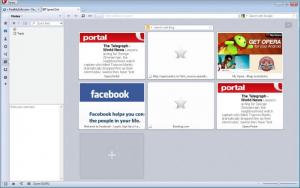
Also in the speed category I think we can safely include the Speed Dial feature and the widgets. Speed Dial works something like this: when you open a new tab, instead of being presented with a blank page (as is the case with Firefox at the moment) you are presented with a list of up to 25 thumbnail previews of the sites you visit the most. The list is completely customizable of course. The Opera widgets are small, standalone apps that are displayed on top of the browser. Now the reason I’m including them in the speed category and not in the customization one is because they let you easily and speedily access all sorts of info – like check the latest news, check the weather, or make a swift currency conversion.
Security-wise, Opera comes with everything you need: pop-up blocking, phishing protection, malware protection, privacy controls, auto-update and so on. There is one other thing that contributes to Opera’s security. The simple fact that Opera does not have such a large user base as other browsers makes it a safer choice - malware spreaders and virus writers do not see it as such an appetizing target as Internet Explorer for example.
Pros
Comes free of charge
Cross-platform (works on Windows, Mac OS X, Linux and Symbian)
Download BitTorrent files within the browser
Widgets
Speed Dial
Easy on system resources
Safe
Cons
None that I could think of
Speaking of functionality, it is a well known fact in the IT world that Opera is an innovator, a web browsing pioneer. Take tabbed browsing for example – for the novice computer user tabbed browsing means that you can open multiple URLs in the same browser window, in tabs or sub-windows if you will. Back in the day when IE users did not even know what the word meant, Opera provided this feature. Now tabbed browser is one of those features that comes as a standard on pretty much every browser out there.
Opera’s functionality is obvious when you take a look at all the things it comes bundled with. As long as you have Opera installed on your machine, you will benefit from a properly good browser, download manager, BitTorrent client, web feed aggregator, email client, and IRC chat client.
Just because Opera comes bundled with all these features, it does not mean the software will need considerable amounts of processor power to work properly. As the development process of the Opera browser moved forward in time (Opera is around for more than 15 years now), the team behind it constantly addressed the need to provide a fast browser without hogging all the computer’s resources. Consequently Opera renders web pages fast without using that much memory – in fact, it is lighter on the system than Internet Explorer or Firefox are.
Also in the speed category I think we can safely include the Speed Dial feature and the widgets. Speed Dial works something like this: when you open a new tab, instead of being presented with a blank page (as is the case with Firefox at the moment) you are presented with a list of up to 25 thumbnail previews of the sites you visit the most. The list is completely customizable of course. The Opera widgets are small, standalone apps that are displayed on top of the browser. Now the reason I’m including them in the speed category and not in the customization one is because they let you easily and speedily access all sorts of info – like check the latest news, check the weather, or make a swift currency conversion.
Security-wise, Opera comes with everything you need: pop-up blocking, phishing protection, malware protection, privacy controls, auto-update and so on. There is one other thing that contributes to Opera’s security. The simple fact that Opera does not have such a large user base as other browsers makes it a safer choice - malware spreaders and virus writers do not see it as such an appetizing target as Internet Explorer for example.
Pros
Comes free of charge
Cross-platform (works on Windows, Mac OS X, Linux and Symbian)
Download BitTorrent files within the browser
Widgets
Speed Dial
Easy on system resources
Safe
Cons
None that I could think of
Do you like
Opera?
Opera?
Advertising
Popular News
Popular micro-blogging and social networking service Twitter has made an announcement that came as a shock for advocates of online freedom. Twitter announced that as it continues to grow at
We all start the year with resolutions, such as “this year I’m going to more carefully watch what I eat”, or “this year I will try to be less stressed”. Most times we discard these resolutions just as easily as
Opera Awards
Opera Editor's Review Rating
Opera has been reviewed by George Norman on
15 Sep 2009. Based on the user interface, features and complexity, Findmysoft has rated
Opera
5
out of 5 stars, naming it EssentialYour Rating
Top Downloads
2.
Opera5.
Trillian8.
AIM9.
Skype10.
Ad-Aware12.
Nero13.
Google Earth14.
Picasa15.
Winamp16.
iTunes17.
RealPlayer18.
uTorrent19.
eMule20.
WinRAR21.
BitComet22.
WinZip23.
Shareaza24.
CCleaner25.
Recuva26.
Tweak UI27.
CuteFTP Home29.
Adobe Reader30.
NewsPiperBecome A Fan!
Link To Us!
Opera
HTML Linking Code
HTML Linking Code